CAPTURE: record live notes into four loops
Caravel 1.0.0 candidate · PLAY layer · RAM-only performance loops.
In 60 seconds Start PLAY/transport, play some notes on the panel or via USB/TRS MIDI IN, then tap REC. That track now loops what you played. A second REC adds a new live take; tap SEQ to pause/resume, or hold SEQ to clear the loop.
1. First loop: play, then capture
Enter PLAY by holding HOME for one second. Start transport with PLAY (or a working external MIDI clock/START), select a track, and play a short phrase. Tap REC to take the recent notes retrospectively. CAPTURE creates a loop of the chosen length; you do not need to arm a conventional step-recording lane before playing.
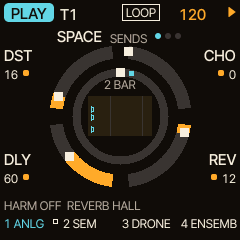
CAPTURE records *live note input* from panel keys and incoming USB/TRS MIDI notes while the transport runs. It keeps raw pitch, velocity, note-on/off timing and track ownership. It does not sample audio, and it does not record ARP output, sequencer playback or its own loop output.
2. Choose a length independently for each track
Hold REC to display CAPTURE. While REC is held, turn K1 to select 1, 2, 4, 8, 16 or 32 bars for the *next new loop on the selected track*. Each track remembers its own LENGTH selection (initially two bars); the display identifies the track. Release the button after viewing the length; the view gesture itself is not a capture.
A loop's length is fixed after it has been taken. To choose another length, clear only that track's loop first and then set the new length. For example, T1=32, T2=8, T3=4 and T4=1 bars can run simultaneously. If no valid clock is running, CAPTURE reports NO CLOCK: PRESS PLAY.
3. Overdub rather than replacing the loop
With an existing loop playing, play additional notes live and tap REC again. CAPTURE adds only the newer live gestures to the same loop, preserving its length. It does not copy previous overdubs or its own playback into the live input ring.
If there is no new input, the screen may show NOTHING TO CAPTURE or NOTHING TO ADD instead of inserting silence. The live buffer holds up to 32 bars of raw input (limited by its event capacity), so recording is retrospective.
4. Four tracks, PAIR and playback
Each of the four tracks can have its own independent CAPTURE loop. Switching the selected track does not erase the other loops. If PAIR is active, the pair's owner track holds the captured input; recording from the follower still addresses that owner's loop.
The captured notes play back through the *current* track routing. Therefore ARP, LATCH, CHRD and HARMONY can change what you hear without changing the raw loop. For example, record a simple three-note gesture, then change the HARMONY chord and listen to the same loop follow the new context. CAPTURE playback itself cannot teach a live CHORD EXT source.
5. Pause, clear and external clock
In PLAY, tap SEQ to pause or resume the selected loop. Hold SEQ for approximately 700 ms to wipe that track's loop and live history; this is destructive. Stopping transport pauses clock-driven playback and releases the loop's sounding notes. MIDI STOP and clock loss can pause loops as well; restarting transport can resume a waiting loop, but a manually paused loop stays paused until you resume it.
Do not confuse BUILD / SEQ (step sequencing) with PLAY / SEQ (CAPTURE loop pause/clear).
6. Understand the capacity limit
Each loop stores up to 128 events per track, and a complete note normally needs two events (note-on and note-off). Consequently, 128 events are *not* 128 independent notes; at most roughly 64 complete notes fit per loop. A dense take can fill the space early. The FULL / LOOP FULL warning rejects an overflowing take or overdub and preserves the existing loop; CAPTURE must not create a partial set of stuck or missing note-offs.
Try a sparse motif first. If you need to change its length or simplify an overcrowded loop, clear it and capture a fresh take.
7. What does not survive a reboot?
CAPTURE is a live RAM performance feature. The loop is not saved in PROJECT, user presets, autosave or the FORMAT-2 backup. Save the underlying sounds, engine settings, ARP, HARMONY and performance configuration separately. A power-off loses the loop. Use external MIDI recording when you need a durable record of the actual notes.
This guide describes the private 1.0 implementation. The 128-event/32-bar extension has not passed the full host/emulator/target-FM-1 acceptance suite and must not be considered released. The owner has previously exercised the earlier CAPTURE on hardware; the extended build still requires its own device and audio acceptance.
Sequencer and ARP · HARMONY and CHORD EXT · MIDI routing and clock · PLAY and BUILD