Notes, sequencer, ARP and CAPTURE
Caravel 1.0.0 candidate · BUILD / PLAY controls.
In 60 seconds BUILD holds the step sequencer. In PLAY, run transport, play keys or MIDI, then REC captures the recent notes.
1. Sequence in BUILD
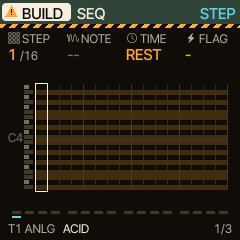
Tap SEQ to reach the step pages. STEP, DETAIL and AUTOMATION use the familiar grid. Select a step and play keys to enter notes; use DETAIL for gate, chance, conditions and ratchets. SEQ + REC selects step recording. PLAY controls transport. Song and Chain are absent in 1.0.
2. Use ARP
Tap ARP and choose a mode, rate, octave span and gate. Hold some keys or send MIDI notes to provide anchors. ARP generates notes from those anchors. LATCH can keep the input after release; panic clears stuck performance state.
3. Capture what you played
In PLAY, start transport and play notes on the keys or through USB MIDI IN or TRS MIDI IN. REC takes the last chosen 1, 2, 4 or 8 bars into the selected track's loop. Another REC overdubs new live input. The four tracks have independent loops; selecting another track does not erase them. For PAIR, the owner track holds the loop.
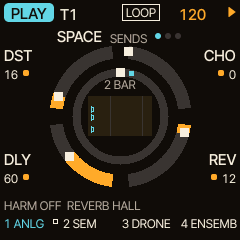
CAPTURE stores raw note, velocity, timing and physical key/note-off, before HARMONY and CHRD. It does not store audio, MIDI pedal/CC automation, ARP output or its own playback. The loop passes through the current ARP, LATCH and harmony settings when played. Changing harmony can therefore change the same captured gesture.
4. Pause, clear and capacity
Tap SEQ in PLAY to pause/resume the loop; hold SEQ to wipe it. Stop transport to pause clock-driven playback. There are at most 64 events per loop, including note-offs. A take that cannot fit is refused as FULL, keeping the previous loop. Loops live in RAM and disappear after power-off: they are not saved or backed up.
Detailed CAPTURE walkthrough · MIDI routing · HARMONY and CHORD EXT