ELASTIC: first steps
Caravel 1.0.0 candidate · BUILD / PLAY controls.
In 60 seconds Choose MOVE / ELASTIC, arm one intended target and begin with a small RANGE.
1. Start gently
Enter PLAY by holding HOME one second, tap LFO for MOVE and browse to ELASTIC. In BUILD the LFO family includes SPRING and SPRINGS setup. Start with a quiet sound and one continuous target in the track's own set.
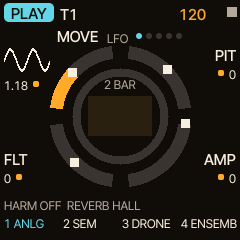
2. Arm a target
Use the displayed ELASTIC verbs with LFO held and D5/E5/F5/G5. Read the on-screen labels: the keys act on the shown group, rather than the old HOME ACTION bank. Arm only the targets you want to move.
3. Shape its motion
PULL sets the displacement, RETURN the return tendency, RANGE the allowed excursion and BOUNCE its tempo-related period. Increase one control at a time. Release or stop the action before changing engine or loading another project.
4. Keep the setup
Project saving keeps the ELASTIC settings, including coupling choices, rather than a running spring's instantaneous position, phase or held gesture. The factory and current target values bound the sound; a wide RANGE can still make a large audible change.