Performance in PLAY and BUILD
Caravel 1.0.0 candidate · BUILD / PLAY controls.
In 60 seconds PLAY exposes SPACE and MOVE. Browse the group, then hold LFO and read the D5/E5/F5/G5 verb labels.
1. Find the current controls
HOME held for one second switches BUILD/PLAY. HOME tapped opens the LEVELS explanation in PLAY or the track overview in BUILD. The old HOME ACTION-bank navigation is not the 1.0 performance workflow.
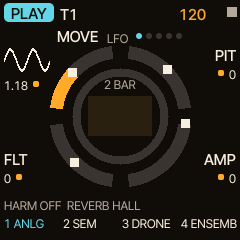
2. MOVE
Tap LFO in PLAY to reach MOVE, then browse LFO, RANDOM, JOURNEY, ELASTIC and PAIR. The screen shows the current group's controls. Hold LFO and use D5, E5, F5 or G5 for the four displayed verbs. Their labels depend on the current group; check them before triggering an action. BUILD has the deeper setup pages.
RANDOM changes the targets in the track's own performance set. JOURNEY moves between that track's snapshots. ELASTIC moves armed targets as springs. PAIR combines two compatible tracks; its owner handles notes and CAPTURE. Project loads set SPREAD to zero on both PAIR members.
3. SPACE and STASIS
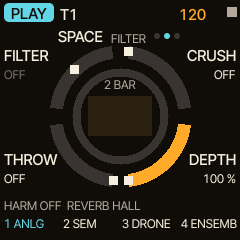
Tap FX for SPACE and browse SENDS, FILTER and STASIS. STASIS holds an audio texture and can add or blend layers. CAPTURE holds note gestures instead. Start with low levels, then compare dry and wet sound.
4. Save durable settings
SAVE opens PROJECT. A project includes sound and performance settings, while CAPTURE loops, temporary FX macros and running spring positions are not durable data. A too-large compressed project is refused with PROJECT TOO LARGE / NOT SAVED; the previous saved copy remains.