Start here: Caravel 1.0
Caravel 1.0.0 candidate · BUILD / PLAY controls.
In 60 seconds Back up with the old matching tool. Start in PLAY, hold HOME one second for BUILD, and tap SAVE for PROJECT.
1. Back up before updating
1.0 starts a new data generation. Save a backup with the firmware and backup tool that currently read your device. Keep that firmware and backup together: 1.0 does not import pre-1.0 projects, user presets or backups. It reports OLD DATA FOUND rather than silently converting them. See installation (source reference: docs/installing.md; see the matching source archive).
2. Start in PLAY
A fresh device starts in PLAY with a one-time LEVELS introduction. Dismiss that explanation, then tap GLO for MIX / LEVEL to balance the four tracks with K1–K4. Tap EDIT for SOUND, play a key and turn its four arcs. ALGO chooses a track. HOME tapped opens the LEVELS explanation; EDIT returns to SOUND.
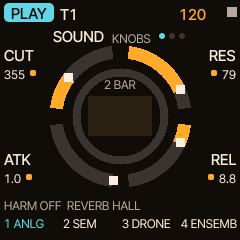
3. Build a sound
Hold HOME for one second to enter BUILD. Tap EDIT to browse the engine controls; hold EDIT to choose an engine and sound. The six engines are ANALOG, PHYS, SEM, HADES, DRONE and ENSEMBLE. ENV shapes the envelope; FX opens sends and effects. A short HOME tap returns to the track overview.
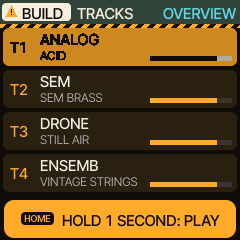
4. Keep your work
Tap SAVE to open PROJECT. Choose a slot and use the displayed SAVE action; confirm replacement when asked. While the clock runs, a save can be kept in RAM until transport stops. Wait for the flash commit before switching off. CAPTURE loops are temporary and are not saved with the project.