Load the performance. Make it yours.
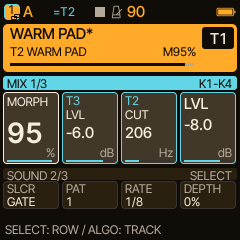
Load the starting project from the feature Short: two SEM tracks in a Pair, a gently driven Drone and twelve HOME controls. Then follow the moves, one control at a time.
Free download · no account · requires Caravel 0.6.0
STASIS 060
Track 1: SEM + slow GATE SLICER.
Track 2: deep SEM, paired with Track 1.
Track 3: a stable Drone with 22% native distortion.
The complete project contains sounds, HOME assignments and Pair state for all four tracks. It is a starting setup; the knob movements and captured audio are not stored in the project.
Your HOME bank
| Row | K1 | K2 | K3 | K4 |
|---|---|---|---|---|
| 1 · Play | Pair MORPH | T3 LEVEL | T2 SEM CUT | Pair LEVEL |
| 2 · Pulse | T1 SLICER | PATTERN | RATE | DEPTH |
| 3 · Colour | T1 SEM CUT | T2 REV | T1 REV | T3 DIST |
SELECT changes rows. Keep Track 1 selected. STASIS HOLD and BLEND use the actual REVERB and LAYER pages. Row names above describe their purpose; they are not custom device labels.
Load it on the FM-1
- Run Caravel 0.6.0, connect USB, stop playback and close other MIDI editors.
- Unzip the full performance download. Install Python 3 and the MIDI dependencies:
python3 -m pip install mido python-rtmidi - In the unzipped folder, check the ports and import into a saved slot you can replace, for example D:
The tool asks before writing. The chosen slot is replaced; save an existing project separately if you want to keep it.python3 caravel_backup.py ports python3 caravel_backup.py import D Caravel_060_STASIS_HOME.hpm - On the FM-1, open SAVE → PROJECT → D and load it.
This imports a project; it does not install firmware or automatically load the working project.
The exact HPM passed the firmware's simulated USB import, flash readback and project-load checks. A physical FM-1 import was not performed here.
Play the notes. Make the moves.
The MIDI file plays notes on channel 1 for the SEM Pair and channel 3 for the Drone, at 90 BPM. It sends no CC or SysEx. Perform MORPH, SLICER DEPTH, STR, HOLD, BLEND and STOP yourself using the guide.
Move times start at the beginning of the 30-second performance; in the 42-second Short, this is video time 0:06.
Hear the 30-second performance
Original Caravel 0.6.0 firmware DSP, natively rendered. This is not an FM-1 hardware recording.