Make a sound last. Then take it further.
Capture a moment, build on a held texture, or move into a new sound. These four short lessons use the actual firmware display.
Capture a sound. Keep it moving.
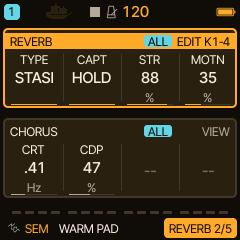
1. Feed the texture
Set a track's REV send to about 85-90%. On FX > REVERB, select TYPE STASIS. This page now reads TYPE / CAPT / STR / MOTN.
2. Capture
Leave CAPT on LIVE and play a chord for at least 0.6 seconds. Turn CAPT to HOLD: the recently played sound continues after you release the notes.
3. Shape the held sound
Start with STR around 70-85% and MOTN around 30-45%. STR brings the texture forward; MOTN moves reflections, filtering and HALL damping while keeping grain playback at its original rate.
Try it: SEM > WARM PAD, a low minor chord, CAPT HOLD, then raise MOTN. STOP releases the texture into the HALL tail.
STASIS captures the internal REV send. It does not record microphone or USB audio. Ordinary tempo DELAY is suspended while STASIS is active.
Add another sound to the texture.
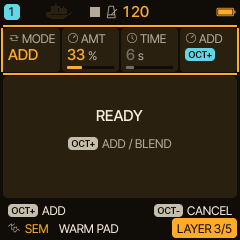
1. Keep HOLD
Leave CAPT on HOLD and open FX > LAYER. The controls are MODE / AMT / TIME / action. Choose MODE ADD; AMT 25% is a good starting point.
2. Play the addition
Play the new sound with its REV send enabled for about 0.6 seconds. Every track with REV send contributes, so lower the other sends if you want just one source.
3. Press OCT+
OCT+ starts the overdub. MIX fades in the new recording over 200 ms; STORE finishes the mixture in about 0.75 s. READY means you can add again. CAPT remains HOLD.
Try it: hold a SEM pad, add a low DRONE note, then a higher HADES note. After capture you can mute each live source; its contribution remains in the texture.
AMT is the new sound's share: 25% new + 75% old. Gains are complementary to keep repeated additions bounded. The layers merge and cannot be removed individually.
Blend into a new held texture.
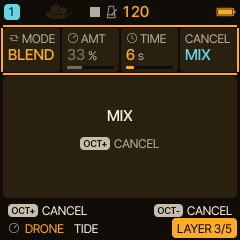
1. Choose the transition
With CAPT HOLD, open LAYER and choose MODE BLEND. Set TIME from 1 to 30 seconds; start with 6 s. AMT is not used in BLEND.
2. Play, then start
Play the destination sound through REV send for about 0.6 seconds, then press OCT+. A snapshot of the new sound replaces the held texture over TIME.
3. Hold the destination
When MIX and STORE finish, the destination stays in HOLD. This is one transition per press, not continuous automatic capture. Press OCT+ during WAIT or MIX to return smoothly to the original.
Try it: hold DRONE > TIDE, then blend into a brighter SEM > OB STRING chord. Release or mute the live source after capture to hear the transition alone.
WAIT keeps the original while there is no sufficiently recent input. During STORE the commit finishes before another operation. STOP and HOLD > LIVE release the audible mixture normally.
Keep projects safe when upgrading.
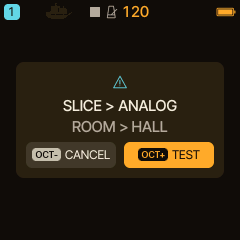
1. Know the 0.6.0 profile
The release contains HALL and STASIS. ROOM, SPRING and the SLICE engine are omitted to fit the target. The separate SLICER track effect remains available.
2. Review the warning
Projects using omitted features show the actual substitutions: SLICE > ANALOG and ROOM/SPRING > HALL. OCT- CANCEL leaves the current session untouched; OCT+ TEST loads a converted working copy.
3. Save a separate copy
The source slot stays protected for the session. Save the audition into another slot. For RESTORE LAST, occupied slots are protected because the original source slot is unknown; use an empty slot.
Before updating: export a complete backup with matching Caravel tools. Keep user banks with the performance. The public installer provides the matching 0.6.0 package.
Project saves keep MODE, AMT and TIME, but not the captured audio. Textures live in RAM. Automated tests pass; actual FM-1 worst-case load, physical USB/OTA and long-term stability are not certified by host tests.
HOME, Pair Morph, macros and performance storage tutorials
Replay the feature Short.
Load STASIS 060: the complete HOME project, MIDI notes and the individual moves.